
Skip to content
  • Events
  • Gallery
  • The Bars
  • Dance Lessons
  • Karaoke
  • The Music
The Round-Up Saloon and Dance Hall
  • Our Staff
  • About Us
  • Find Us
  • Contact Us
  • Employment
Account
Account
The Round-Up Saloon and Dance Hall

Bag-In-Box Distribution

2
  • BIG CO2 Tank Basics (How to Tell if It’s Low, etc)
  • Switch Entire Bar’s CO2 Source TO or FROM a Small Backup Tank

Emergency Procedures

2
  • Fire Alarm Procedure
  • Micros Terminal Swap-Out Procedure

Facilities / Building

2
  • Fire Alarm Procedure
  • HVAC Troubleshooting & Diagnosis

General Employment Info

2
  • Links to Required Employee Certifications & Training
  • What’s On Your Mind?

Kegerators

1
  • Solving a Foamy Beer Situation

Manager

2
  • Manager Closing Checklist
  • Micros Terminal Swap-Out Procedure

Micros

4
  • Micros Terminal Swap-Out Procedure
  • Pop-Up: “CHANGE TO BARXX?”
  • Pop-Up: “Failed to create OPI Comm”
  • Pop-Up: Enter Backup Server Mode?

Payroll Related

3
  • Correcting a Missed Clock-In or Clock-Out
  • Getting Set Up with ADP Mobile
  • Requesting Vacation & Sick Time in ADP

Staff Duties & Checklists

2
  • BUSSER – DUTIES & CHECKLISTS
  • DOOR PERSON – DUTIES & CHECKLISTS

Weather Related

3
  • EXTREME COLD (< 25F) WEATHER – CLOSING PROCEDURE
  • NON-EXTREME COLD WEATHER – CLOSING PROCEDURE
  • WINTER WEATHER – OPERATING GUIDELINES & PROCESSES
  • Home
  • Round-Up Employee Wiki
  • Micros
  • Pop-Up: “CHANGE TO BARXX?”
View Categories

Pop-Up: “CHANGE TO BARXX?”

0:00 / 1:03
  • View as Markdown Open this page as plain Markdown (opens in a new tab)
  • Open in ChatGPT Ask questions about this page (opens in a new tab)
  • Open in Claude Ask questions about this page (opens in a new tab)
  • Open in Google AI Studio Ask questions about this page (Google account required) (opens in a new tab)

How to Respond to THE mysterious MICROS “Change to BARXX?” prompt #

When you first log in to your Micros register, if you are presented with the following prompt:
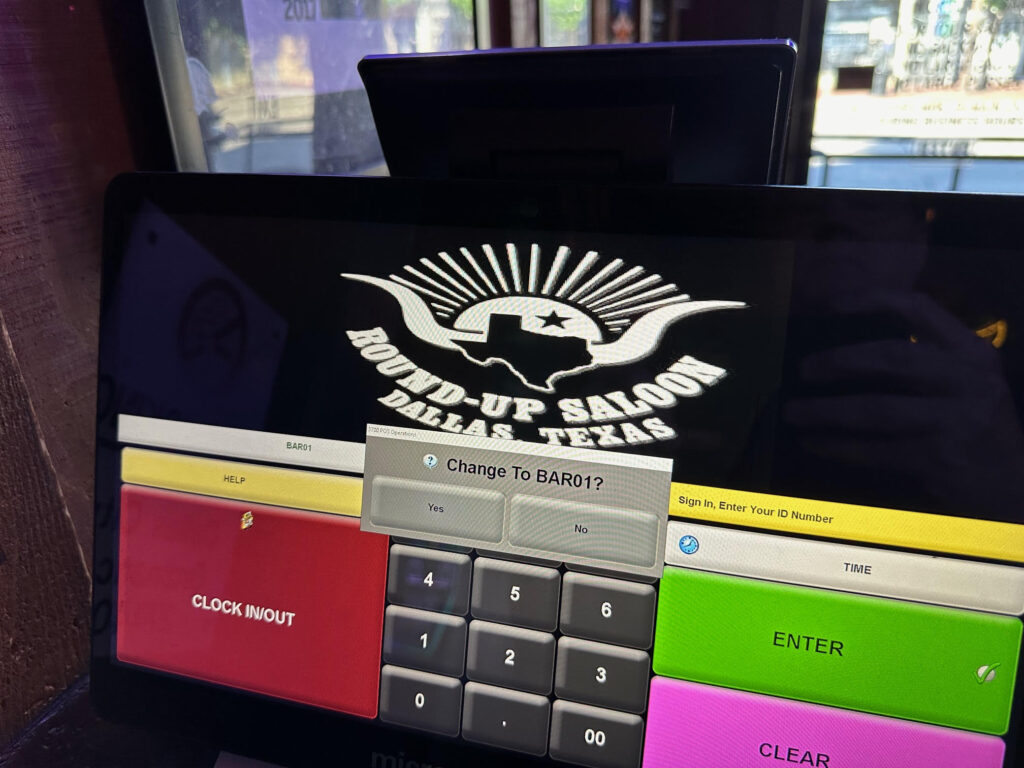
How should you respond? There are two ways to respond, depending on how you answer one question:

AM I STANDING AT THE REGISTER SHOWN IN THE DIALOG BOX? #

If you ARE standing at the register shown: Click the “YES” button.

If you ARE NOT standing at the displayed register: Click the “NO” button.

What happens if I press the wrong button? #

Don’t panic! You’ve so far done nothing wrong!

DO NOT RING ANYTHING UP!

Get a Manager and have him reassign your Register ID to the correct register.

That’s it! It’s simple to solve and correct.

BUT, if you blindly proceed without addressing the issue in a timely fashion:

  • You create a lot of work for someone else
  • Your inventory could be off
  • You might be assigned a shortage on your bank bag
  • Any tips closed out on credit cards might be assigned to the bartender working the register you just told Micros you were working at.
What are your Feelings

Share This Article :

  • Facebook
  • X
  • LinkedIn
  • Pinterest
Updated on January 16, 2025
Micros Terminal Swap-Out ProcedurePop-Up: “Failed to create OPI Comm”

Powered by BetterDocs

Table of Contents
  • How to Respond to THE mysterious MICROS "Change to BARXX?" prompt
  • AM I STANDING AT THE REGISTER SHOWN IN THE DIALOG BOX?
  • What happens if I press the wrong button?

STAY IN THE KNOW

Facebook Twitter Instagram
  • Events
  • The Bars
  • Dance Lessons
  • Karaoke
  • Our Music
  • Our Staff
  • About Us
  • Find Us
  • Contact Us
  • Employment

© 2026 The Round-Up Saloon and Dance Hall

Scroll to top
  • Events
  • The Bars
  • Dance Lessons
  • Karaoke
  • Our Music
  • Our Staff
  • About Us
  • Find Us
  • Contact Us
  • Employment